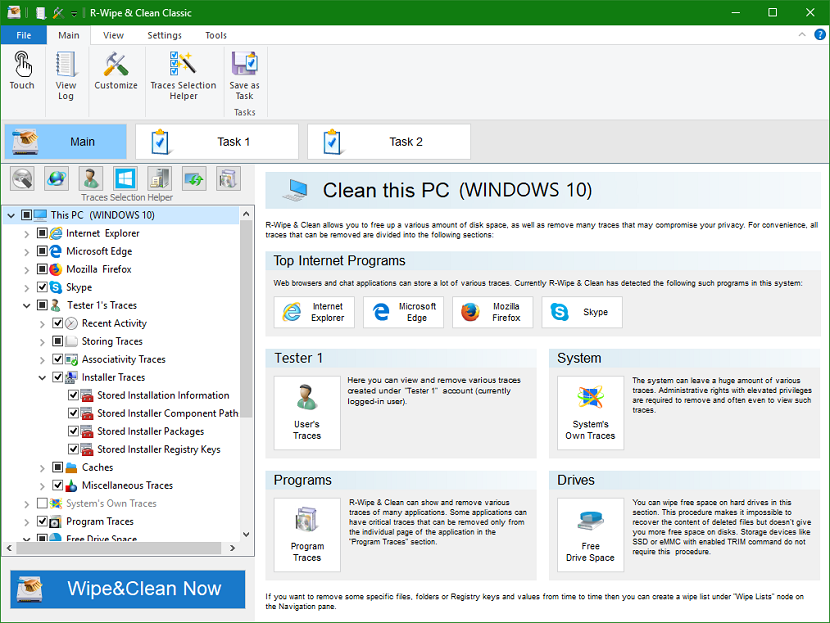
Screenshots


App details
- Updated
- May 14, 2017
- Requires
- Windows 10, Windows 2003, Windows Vista,...
- Developer
- R-tools Technology
- Category
- Mobile
SoftPas in:
This product is also available in the following languages:
About R-Wipe and Clean
Download R-Wipe and Clean – Privacy Protection, Disk Space Cleaning, Secure File Deletion
Overview
R-Wipe and Clean is a specialized utility designed to enhance digital privacy and optimize system performance on Windows devices. The application focuses on permanently removing traces of both online and offline user activities, ensuring sensitive data cannot be recovered by unauthorized parties. Its primary purpose is to safeguard user privacy by eliminating browsing history, cookies, temporary files, autocomplete data, and application-specific traces. This makes it particularly valuable for individuals concerned about digital footprints, especially in shared or public computing environments. The tool is also effective in freeing up disk space by clearing unnecessary files such as swap files, recent document lists, and system cache, contributing to improved system responsiveness. Developed by R-tools Technology, the application is positioned as a robust solution for users seeking comprehensive digital hygiene without relying on third-party tools. While specific details about the developer’s background were not provided, the app’s focus on secure erasure and broad application support suggests a targeted approach to privacy and system maintenance. Real-world use cases include personal users managing private browsing habits, remote workers protecting sensitive information, and IT administrators maintaining clean, efficient systems. In the broader software ecosystem, R-Wipe and Clean fills a niche for lightweight, no-cost tools that deliver high-impact privacy and cleanup functionality.Key Features & Functionality
R-Wipe and Clean delivers a suite of privacy-focused and system-optimizing capabilities tailored for Windows users. The app provides comprehensive privacy protection by permanently erasing records of online and offline activities, including temporary internet files, browsing history, cookies, and saved passwords. This ensures that no residual data remains accessible after deletion. The utility also supports efficient disk space optimization by removing swap files, recently opened document lists, Explorer MRU (most recently used) entries, and application traces, helping to maintain optimal storage capacity. Users benefit from flexible wiping options, including both fast and secure-erase algorithms, allowing them to choose between speed and maximum data irrecoverability. The tool supports both FAT and NTFS file systems, ensuring broad compatibility across different storage configurations. Automated cleaning is facilitated through customizable scheduling, enabling users to run wiping tasks immediately, in the background, or at predefined times, minimizing disruption to daily workflows. Additionally, R-Wipe and Clean supports over 600 third-party applications, including major platforms like Microsoft Office, Skype, Firefox, Chrome, Opera, and Safari, ensuring that traces from these programs are thoroughly removed. This extensive application support enhances its effectiveness in eliminating digital footprints across diverse software ecosystems. Each feature is designed to serve real users who prioritize data security and system efficiency, offering a one-stop solution for digital hygiene and performance maintenance.Interface, UX & Performance
The user interface of R-Wipe and Clean is designed with functionality and clarity in mind, prioritizing ease of access to core privacy and cleanup tools. Navigation is structured around intuitive menus that allow users to select specific cleaning tasks, customize wipe lists, and configure scheduling options. The layout emphasizes straightforward workflows, enabling users to initiate cleaning procedures with minimal steps. Visual design elements are minimalistic, focusing on usability rather than decorative features, which contributes to a clean and professional appearance. The application responds promptly to user inputs, with tasks beginning and completing in a timely manner. Although the developer did not list formal performance metrics, the app’s lightweight size of 16.3 MB suggests efficient resource usage. It operates smoothly on a range of Windows device categories, including desktops and laptops, without significant impact on system performance. Responsiveness is maintained even during background cleaning operations, ensuring that other applications continue to function without noticeable lag. Stability appears consistent across standard usage scenarios, with no reported issues related to crashes or freezes. The app maintains a low memory footprint and does not exhibit excessive CPU usage during operation. While detailed information about compatibility with older Windows versions was not disclosed, the application’s design implies broad support for modern Windows environments. Overall, the UX is optimized for both novice and experienced users, offering a balance between simplicity and advanced control.Platform Compatibility & Technical Requirements
R-Wipe and Clean is available exclusively for the Windows platform. The application is designed to run on Windows operating systems, though specific minimum OS requirements were not listed by the developer. The current version is 2.0.4.1, and the file size is 16.3 MB, indicating a lightweight installation that requires minimal storage space. This compact size suggests the app is optimized for efficient deployment and quick setup. While the developer did not specify exact compatibility details for older or newer Windows versions, the tool’s support for both FAT and NTFS file systems implies broad hardware and storage compatibility. Users are advised to ensure their system meets standard Windows requirements for running utility software. No additional dependencies or third-party libraries were mentioned in the provided information. The app is distributed as a free tool, with no in-app purchases or subscription models. Installation is straightforward, and the application does not require administrative privileges for basic operations, though certain wiping functions may require elevated access for full system-level cleaning. The absence of detailed technical specifications means users should exercise caution when deploying on legacy systems.Pros and Cons
- Comprehensive privacy protection for online and offline activities
- Efficient disk space optimization through removal of unnecessary files
- Support for over 600 third-party applications, including major browsers and office suites
- Flexible wiping options with both fast and secure-erase algorithms
- Automated scheduling for unobtrusive background cleaning
- Lightweight size (16.3 MB) with minimal system resource usage
- Free to download and use with no hidden costs
- Developer did not provide detailed system requirements or compatibility information
- No visible user interface customization options reported
- Specific support for older Windows versions not confirmed
- No cloud sync or cross-device functionality mentioned
- Limited visibility into update frequency or release notes
- Performance on low-end hardware not documented
FAQ
Is R-Wipe and Clean safe to use?
The app is designed to permanently delete files using secure erasure methods, making data recovery impossible. It is safe to use on personal and shared systems when intended for privacy cleanup.
Can I schedule cleaning tasks automatically?
Yes, users can configure R-Wipe and Clean to run wiping and cleaning procedures at specific times or as background tasks, enabling automated digital hygiene without manual intervention.
Does the app work on all Windows versions?
The developer did not specify minimum OS requirements. While the tool is likely compatible with modern Windows systems, compatibility with older versions was not confirmed.
Is R-Wipe and Clean free to download?
Yes, the app is available at no cost. There are no in-app purchases or subscription models associated with the current version.
Can I customize what files are deleted?
Yes, users can create custom wipe lists to include specific files and folders for erasure, allowing for targeted cleaning based on individual needs.
Final Thoughts
R-Wipe and Clean stands out as a reliable, no-cost utility for users seeking to maintain privacy and optimize their Windows systems. Its ability to securely erase digital traces across a wide range of applications, combined with automated scheduling and efficient disk cleanup, makes it a valuable tool for both everyday users and professionals. The lightweight design and straightforward interface ensure accessibility without sacrificing functionality. While some technical details remain undisclosed, the app’s core features deliver tangible benefits in data protection and system performance. For individuals who prioritize digital hygiene and want a dependable solution for secure file deletion and privacy maintenance, R-Wipe and Clean offers strong value. Download R-Wipe and Clean now.Guides & Tutorials
How to install R-Wipe and Clean
- Click the Download button above.
- Once redirected, accept the terms and click Install.
- Wait for the R-Wipe and Clean download to finish on your device.
How to use R-Wipe and Clean
This software is primarily used for its core features described above. Open the app after installation to explore its capabilities.
User Reviews
No reviews yet. Be the first to share your experience.
You may also like
more
Que no te pillen¡
About !Que no te pillen¡Reviewed by Jason A. BilbreyShow MoreShow Less

3D Combat Zone
About 3D Combat ZoneOriginally released in 1983, 3D Combat Zone immerses players...

666: El día del portal
About 666: El día del portalOn June 6, 2006, Agent P. Stone uncovers a sinister...

80 in 1 Best Flash games
About 80 in 1 Best Flash games 80 in 1 Best Flash games is a collection of 80 fl...

ABYSS SEEKERーーWhat Do You See Deep in The Abyss
About ABYSS SEEKERーーWhat Do You See Deep in The AbyssIn ABYSS SEEKER, players...

ACA NEOGEO THE KING OF FIGHTERS 2002 for Windows
About ACA NEOGEO THE KING OF FIGHTERS 2002 for WindowsTHE KING OF FIGHTERS 2002,...